
Breakout Rooms allow you to split meeting participants into smaller groups for discussions, collaborative activities, peer learning, or problem-solving tasks. Tutors can create rooms automatically or manually, move between rooms, and bring everyone back to the main session when needed.
Breakout rooms can be created and managed by anyone with the Organiser or Co-organiser role.
Watch the video ‘Breakout Rooms here.
Creating breakout rooms
- During your meeting, select the rooms icon from the meeting controls.
- Enter the number of breakout rooms you want to create.
- Choose how participants will be assigned:
- Automatically assigns participants to rooms.
- Manually allows you to assign participants yourself.
- Select Create rooms.
Important settings before opening breakout rooms
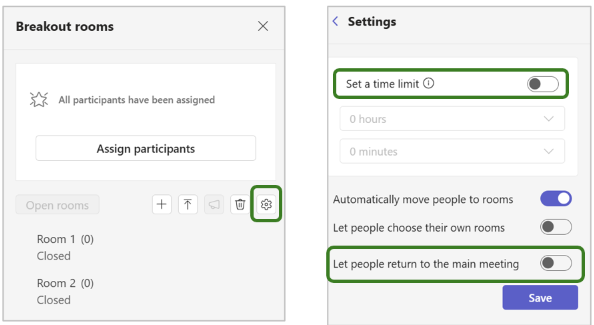
- Before opening the rooms, select the Settings (cog wheel) icon.
- Enable Participants can return to the main meeting. This is highly recommended, as without this setting students can only leave the breakout room by leaving the meeting entirely.
- If required, set a time limit for all breakout rooms.
- Select Save to apply your settings and return to the breakout room overview.
Opening and managing breakout rooms
- Select Open rooms. Students will receive a notification that they will be moved to their breakout room after a short countdown.
- Select a room name to view the participants assigned to that room.
- To join a breakout room, select the three dots (⋯) next to the room and choose Join room. Organisers and co-organisers can join any open breakout room.
- Use make an announcement to send a message to all breakout rooms simultaneously.
